Agentic AI · Field Guide
Before you pick a tool, read this
A plain field guide to AI agents — for people who keep hearing the words and want to actually understand them.
Most people come to a page like this wanting to know which tool to buy. That’s the wrong question to start with, and it’s the one everyone starts with anyway. Businesses get gullible about things they don’t fully understand yet, and right now almost nobody fully understands this.
Here’s the thing nobody tells you. You don’t need to pick a tool yet. You need to understand what an AI agent is actually made of. Once you know that, the tools start to make sense on their own.
I’ll be honest, half the “AI agencies” you’ll talk to don’t really understand this either. Anyway.
So that’s what this page does. Part by part. For each one I’ll show you what’s out there right now — free, paid, which are doing well, which are quietly dying. No selling.
An agent is six things, really. A brain. The wiring that holds it together. Memory. Knowledge of your business. Hands to actually do things. And a way to keep an eye on it once it’s running. We’ll go through them one by one. The order matters less than you’d think, but a brain is a reasonable place to start.
1. What “agentic” even means
A chatbot answers. An automation runs the same steps every single time. An agent gets a goal and works out the steps itself.
It’s easier to see than to define. Say a customer emails you. A chatbot can tell them your opening hours. An agent reads the email, works out it’s actually a refund they’re after, pulls the order, checks if it qualifies, refunds it or flags it for you, and writes back. Nobody wrote those steps down for it. It found the path on its own — and it’d take a different path for the next email.
That’s all “agentic” means. Able to act. It doesn’t mean clever, and it definitely doesn’t mean conscious, whatever the LinkedIn crowd is posting this week.
Half the briefs I get want an “agent” and what they actually want is a button that emails their team. Sell them the button. Agent money for agent work, not for a Google Form in a hoodie.
Underneath, every agent runs the same small loop. Look at the situation. Decide. Do the thing. Check what happened. Go again. That loop is the whole magic trick.
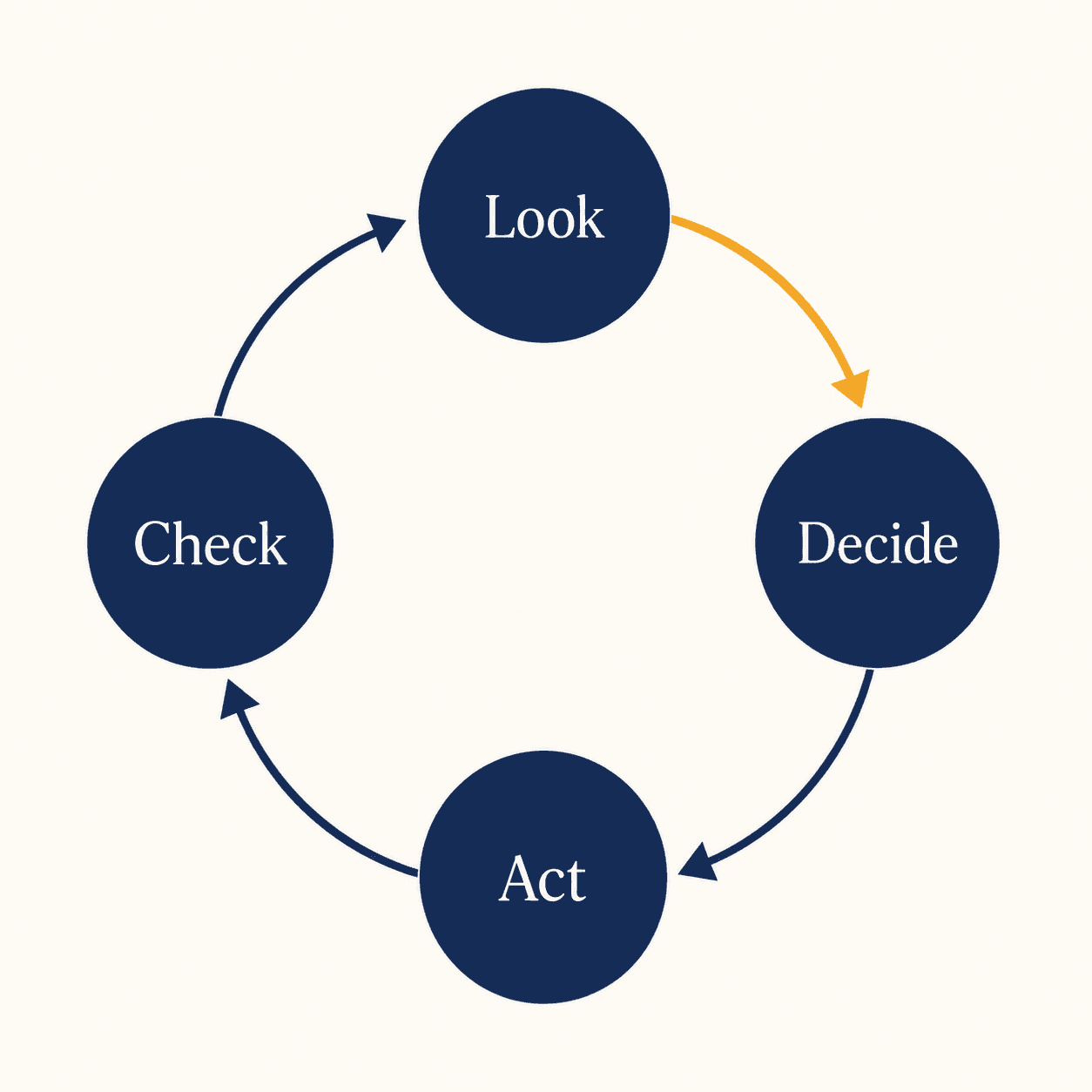
Quick gut check before anyone sells you an “agent.” Ask four things. Does it decide its own next step? Can it actually do stuff — send, update, create — not just talk? Does it remember anything? Can it recover when a step goes wrong? If the answers are mostly no, it’s a chatbot wearing a nicer jacket. And that’s fine, sometimes a chatbot is all you need. More on that at the end.
2. The brain
The brain is the model. The thing that does the reasoning. Claude, GPT, Gemini, the open-source ones — that’s the brain.
Good news first: you don’t marry one. Agents swap models the way you’d swap a part in a machine. So this decision, the one people agonise over, matters less than it sounds.
There are really only two questions. Do you want the smartest model going, or one you can run on your own servers? And do you care whether your data leaves the building?
The smartest ones are closed. You rent them by the word. They’re very good at thinking through a job that has ten steps. The other camp is open-weight — Llama, Mistral, Qwen, DeepSeek. You run those yourself. Cheaper once you’re doing real volume, private, and you need somebody who can keep a server breathing.
| Model | Type | Where it runs | What it's good at | Cost |
|---|---|---|---|---|
| Claude | closed | their servers | reasoning, using tools, long multi-step jobs | per word |
| GPT | closed | their servers | all-rounder, huge ecosystem around it | per word |
| Gemini | closed | their servers | images + video, fits the Google stack | per word |
| Llama / Mistral / Qwen / DeepSeek | open-weight | yours, or rented | privacy, cheaper at scale, you can fine-tune | the model's free — you pay for the machine |
One warning, because people get this wrong. Model rankings shift almost every month. Don’t pick because of a benchmark you saw once. Pick so you can switch later, because you will switch later.
Everyone reaches for GPT-4o by reflex and then can’t work out why the bill blew up on a job a 7B open model would’ve done in its sleep. Pick by the job, not the headline ranking.
3. The wiring
If the model is the brain, the framework is the wiring. It decides what the agent does first, what it does next, and what happens when something breaks halfway through.
You’ll never touch it. But “which framework?” is one of the first things any developer asks you, and the answer quietly decides how hard it’ll be to change things later. Pick wrong and a small change turns into a rebuild.
The landscape went mad for two years and then settled down fast. Every big AI lab ships its own now. And they mostly speak a shared standard these days, so swapping pieces between them got cheaper than it used to be.
| Framework | Free / open? | Paid bit | Known for | Worth knowing |
|---|---|---|---|---|
| LangGraph | yes | managed add-ons | the serious one — approvals, retries, audit trails, surviving real traffic | overtook CrewAI in popularity early this year |
| CrewAI | yes | cloud + enterprise (~$25/mo up) | getting a first agent working fast, agents that act like a little team | often 30–60 lines to something that runs |
| AutoGen → Microsoft Agent Framework | yes | Azure-tied | Microsoft shops, conversational multi-agent | AutoGen got folded into the MS framework; AG2 is the community fork keeping the old spirit |
| OpenAI Agents SDK | yes | tied to OpenAI usage | quickest path for one OpenAI-based agent | very OpenAI-centric, as you'd guess |
| Claude Agent SDK | yes | tied to Claude usage | tool use, computer use, safety baked in | pulled out of Claude's own coding tool |
| Google ADK | yes | Vertex managed | layered agents, multimodal | best if you already live on Google Cloud |
| Agno | yes | — | lightweight, role-based | smaller crowd, fewer ready-made bits |
The honest filter isn’t “which is best.” It’s which one your team can still operate six months after launch, when the person who built it has moved on. The flashiest framework in a weekend demo is often the worst at that.
We’ve moved most production builds to LangGraph this past year — not because it’s fashionable but because the audit trail and a real retry layer save you the 2 a.m. call. CrewAI is still where we prototype on day one.
4. Memory
Left alone, a model forgets everything the second the chat ends. Memory is the bolt-on layer that lets an agent remember a customer, recall what got decided last week, hang on to what it learned.
Here’s the catch people miss. A lot of what gets sold as “memory” is just the agent re-reading the last few messages. Real memory stores things and then pulls the right thing back out later, which is harder than it sounds and is a top reason agents quietly go stupid over time.
Most of these are free to self-host, with paid cloud tiers once you grow.
| Tool | Free? | Paid | Best for | Note |
|---|---|---|---|---|
| Mem0 | free tier, ~1K memories | $19/mo (10K), Pro $249/mo for the graph stuff | general "remember this customer" personalisation | biggest community, runs AWS's agent memory |
| Zep / Graphiti | Graphiti's open and free to self-host | Zep Cloud free for 1K episodes, then ~$125/mo up | "what was true back in Q1" — facts that change with time | heavier to set up, wants a graph DB underneath |
| Letta (was MemGPT) | open source | managed cloud, in beta | long-running agents that edit their own memory | the OS-style memory idea, if that means anything to your dev |
| LangMem | open source | — | teams already on LangGraph | path of least resistance there |
| Cognee | open source | cloud tiers | knowledge-graph-heavy needs | newer, smaller |
You can start free. The jump to paid is about scale and the fancier graph features. Fair to put that off until the agent’s actually earning.
Built a support agent that cheerfully asked every returning customer to pay again — every conversation, fresh slate. Memory off by default does that. Now we ship it on by default and turn it down later if we have to.
5. Knowledge — how it knows your business
Models know the public internet up to some cutoff date. They do not know your price list, your refund policy, or last year’s support tickets. So out of the box, an agent will answer questions about your business by guessing, confidently, and wrongly.
The fix is a thing called RAG. Strip the jargon and it’s simple: before the agent answers, it goes and looks things up in your documents, then answers from those. The bit that makes the lookup fast is a vector database — think of it as a search engine that finds by meaning instead of exact words.
It’s not magic, though. If your documents are a mess, or they contradict each other, the agent will be a confident mess too. Garbage in, confident garbage out.
| Vector DB | Free / open? | Managed price | Best for | Note |
|---|---|---|---|---|
| pgvector | yes — it's a Postgres add-on | free, lives in the DB you already have | you're on Postgres already, under a few million records | with the right index it’s 5–8ms, genuinely fine |
| Chroma | yes | cloud tiers | prototypes, new projects | a small cheap server handles millions of records |
| Qdrant | yes (Rust) | cloud from ~$25/mo | heavy filtering — legal, compliance | easiest of the dedicated ones to self-host |
| Weaviate | yes | cloud from ~$25/mo | keyword + meaning search in one go | brings its own embedding bits |
| Pinecone | free tier, 100K vectors | storage ~$0.33/GB/mo + usage; ~$70/mo at 10M vectors | fully managed, zero fuss | can't self-host or air-gap it; gets pricey way up high |
| Milvus | yes | Zilliz Cloud | billion-record monsters | overkill for most, heavier to run |
Most small businesses never outgrow free pgvector or Chroma. Let me say that again because it saves you money: most of you will never need the paid one. You pay for a managed database to buy back the time your dev would’ve spent babysitting infrastructure — not to “go faster.”
Pulled a clinic’s policies out of three Google Drives, two WhatsApp folders, and a Word doc named “Final v7 USE THIS ONE”. The agent only answered correctly after we threw out half of them and rewrote what was left. The RAG wasn’t the hard bit.
6. Hands — how it actually does things
A model that only talks is, again, a chatbot. What turns it into an agent is the ability to do — send the email, update the CRM, raise the invoice, check stock.
Two ideas worth knowing the names of. Function calling is where the model gets handed a list of buttons it’s allowed to press. MCP is a newer shared standard — picture USB, but for plugging tools into AI — so the same connector works across different agents instead of being rebuilt every time. There are hundreds of these ready to go now.
| Way to do it | Free? | Best for | Note |
|---|---|---|---|
| native function calling | yes, comes with the framework | custom actions your dev defines | most control, most code |
| MCP servers | yes, open standard | reusable connectors across tools | files, databases, the usual SaaS apps |
| Composio | free tier + paid | pre-built, already-authed app connections | saves wiring each integration by hand |
| n8n as the hands | free to self-host | plugging an agent into 400+ business apps | mature, and it can be the whole engine, not just the hands |
“Can it connect to the tools we already use?” The answer is almost always yes now. The real question is how much wiring, not whether it’s possible.
7. “Can’t I just build it myself?”
Fair question. Honest answer has a fork in it.
No-code builders let someone who isn’t an engineer drag boxes around a canvas and end up with a working agent. Genuinely useful. Great for proving an idea exists before anyone spends real money.
The catch — and I’ll say it plainly because it builds trust — these things work beautifully in the demo and get painful to fix the moment something breaks at scale. You can’t easily step through what went wrong. So the pattern that actually works is: prototype it yourself in no-code, then move it to code once it’s doing work that matters.
| Tool | Free / self-host? | Paid from | Skill needed | Best for |
|---|---|---|---|---|
| n8n | yes, unlimited runs | ~$24/mo cloud | some | business automation + agents, most integrations of the lot |
| Flowise | yes (open) | ~$35/mo cloud | some | visual building, full self-hosted control |
| Langflow | yes (open) | cloud tiers | some | biggest community, friendlier if your dev likes Python |
| Dify | yes (open) | ~$59/mo pro | low–some | all-in-one: agent, RAG and monitoring in one box |
| Lindy | no, managed | ~$30/mo per agent | low | SMB agents — inbox, leads, CRM — compliance sorted |
| Relevance AI | free tier | ~$19/mo up | low | no-code business-ops agents |
| Make / Zapier | free tiers | ~$9 / ~$20 mo | low | light AI-flavoured automations, widest app lists |
You can genuinely start this yourself this week, for nothing, with n8n or Dify. The day it touches money or real customers at volume, get an engineer’s eyes on it. Not before. Before that, just play.
n8n is brilliant for getting from idea to running thing in a weekend, and it fights you the second you need real branching logic. I still reach for it first anyway. We move things into code only when the failure mode stops being amusing.
8. The part nobody warns you about — keeping it alive
Getting an agent working once is the easy bit. Keeping it working is the actual job, and it’s where most projects quietly die.
Two plain ideas. Deployment is putting it somewhere it runs reliably, with the right permissions and a record of what it did. Watching it — observability and evals, if you want the words — is keeping an eye on what it’s actually doing, because an agent isn’t predictable. It can take a different route every time, get stuck in a loop, or run up a surprise bill while you sleep.
You can’t test an agent like normal software, where the same input gives the same output. You watch real runs and score them. The good news is the best tools for this have free or open versions, so it’s not some luxury only big companies get.
| Tool | Free / open? | Paid from | Best for | Note |
|---|---|---|---|---|
| Langfuse | yes, free self-host, no limits | cloud tiers | the default open choice — tracing and evals | got acquired this January, still open |
| Arize Phoenix | yes, standards-based | cloud from ~$50/mo | proper eval rigour, hallucination metrics | 25K free traces a month on cloud |
| Helicone | yes, open proxy | usage-based | the simplest start — barely any code change | good for "just start capturing data today" |
| LangSmith | free for 5K traces/mo | $39/seat + ~$0.50 per 1k traces | LangChain/LangGraph stacks | deepest if you're already in that world |
| Braintrust | yes, generous free (1M traces/mo) | usage Pro | eval-first teams, catching regressions | strong testing harness |
| Laminar | yes, free 1GB | $30/mo hobby | debugging agents, replaying a session | agent-first, nice for finding the broken step |
Here’s a question to ask anyone quoting you a build. “How will we watch this after launch?” If they don’t have a real answer, that’s the trap — the one where a brilliant demo turns into a dead project three months later. Most of them won’t have an answer. Now you’ll know what the silence means.
9. Why agents make things up
Let’s kill the scary word. “Hallucination” just means the model is a confident guesser, so when it doesn’t have the right facts in front of it, it makes something up that sounds right.
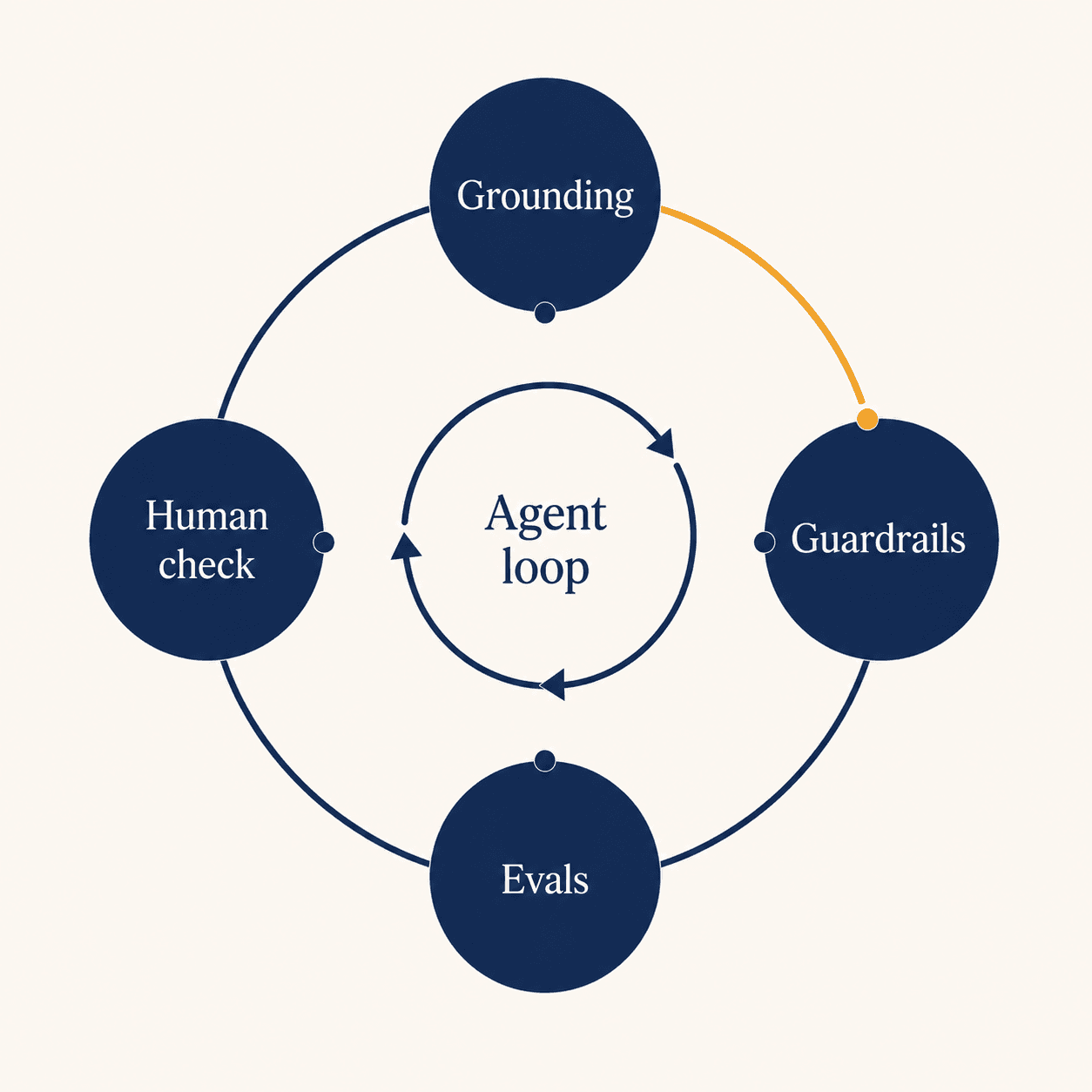
No tool removes this. A stack of habits reduces it, though, and the habits aren’t complicated:
- Grounding — feed it your real documents so it answers from those, not from vibes. (That’s the RAG bit from section 5.)
- Guardrails — rules on what it’s allowed to say and do.
- A human in the loop — a person signs off the risky steps. Refunds over a certain amount, say.
- Evals — keep scoring real answers so you catch it drifting.
The goal was never a perfect agent. It’s a reliable-enough one that you’re watching — same as a decent employee who still needs the odd check. Anyone promising you flawless is either lying or doesn’t know yet.
Watched an agent quote a customer {{verify: real number — e.g. ten times the actual price}} with full confidence because the price list had a typo it inherited cleanly. The lesson wasn’t “AI is dumb.” It was “fix the source first.”
10. When you should NOT build an agent
This is the section that makes the rest believable, so I’ll be straight.
Agents are the right tool when the job needs judgement on messy input. If your task is the same predictable steps every time, you don’t want an agent. You want a plain automation — often just n8n — and it’ll be cheaper, faster and far less likely to surprise you. An agent there is a sports car for the school run.
| If the job is… | You want… | Why |
|---|---|---|
| the same steps every time | a workflow (n8n) | cheaper, predictable, boring in a good way |
| simple rule-based decisions | automation + a bit of logic | an agent is overkill |
| varying input that needs a judgement call | an actual agent | this is the thing agents are for |
| understanding messy language or documents | an agent, with RAG | models genuinely shine here |
A good partner will sometimes tell you not to build the agent. That honesty is worth more than the build is.
A clinic group asked us for an “AI agent” for appointment confirmations. We built them three n8n rules and a WhatsApp template instead. Costs a tenth, runs without anyone watching, hasn’t broken in months. The right answer was the boring one.
11. That’s the whole map
If you read this far, you now understand AI agents better than most of the people trying to sell them to you. The six parts — brain, wiring, memory, knowledge, hands, and the watching — that’s the whole thing. Everything else is detail.
So go play. Spin up n8n, it’s free. Break something.
Build the smallest one you can stand to look at, then put it in front of real users this week. The half-finished thing in production teaches you more in a fortnight than the perfect plan does in six months.
And if, after all that, you’d rather hand it to someone who lives in this stuff every day — that’s what we do. No pitch on the call. Just a conversation about what you’re actually trying to fix.
A few FAQs
- What's the difference between a chatbot and an agent?
- A chatbot answers. An agent gets a goal and does the steps itself.
- Do I have to pick a model or framework forever?
- No. Both are swappable. Pick so you can change later.
- What's RAG, in plain words?
- The agent looks things up in your documents before answering, instead of guessing.
- Can I build an agent myself for free?
- Yes — n8n or Dify, self-hosted. Get an engineer in once it touches real customers.
- Why do agents make mistakes?
- They're confident guessers. Grounding, guardrails, a human check and evals keep it honest.
- When should I NOT use an agent?
- When the task is the same every time. Use a plain workflow.